The first half is about running the sessions. The second is about knowing where every project stands. It's written for anyone running more than one project through Claude Code: a product, client work, a side project, your studies. Every command comes with a line on what it does.
Which setup do you need?
| Your situation | What to use |
|---|---|
| Several unrelated projects | One folder and one session for each |
| Two tasks in the same project at the same time | A worktree for each task |
| One task that touches two repositories | One session with --add-dir |
| One large piece of work split into parallel parts | Anthropic's Projects (beta) |
A note on words: in this guide, a project is a folder of work. Projects, with a capital P, is a feature Anthropic released in September 2026, and it gets its own section below.
Part one: running several projects
Give each project its own folder and CLAUDE.md
One project, one folder, and one short page of context that travels with it. That habit holds whatever the tools do next.
The simplest setup is also the most common one: a terminal window per project, each started inside its own folder.
cd ~/Projects/bakery-app && claude -n "checkout form"
cd ~/Projects/Clients/acme-onboarding && claude -n "signup emails"
cd moves into the project folder, and claude -n starts a session with a name you'll recognise later. In the desktop app, choose the folder when you start a new session.
The folder decides what Claude knows. When a session starts, Claude Code reads the CLAUDE.md in that folder and in every folder above it, plus a personal one at ~/.claude/CLAUDE.md that applies to everything you do. A CLAUDE.md inside a subfolder is read once Claude opens a file there (how Claude Code reads CLAUDE.md). That gives you three layers:
- Everything you do.
~/.claude/CLAUDE.mdholds how you like to work: your language, how much Claude should ask before acting, words you never want in your copy. - A group of projects. A CLAUDE.md in a parent folder applies to every project inside it. If your client work lives in
~/Projects/Clients, that's where invoicing rules, the tone for client emails and "never push to a client's main branch" belong. - One project. The CLAUDE.md in the project's own folder says what the project is, who it's for, how to run it and what's off limits.
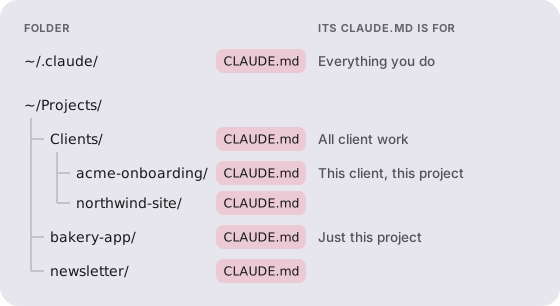
A good project CLAUDE.md is short. Five lines cover most projects: what the project is, who it serves, how to run or preview it, what "done" means for the current goal, and what Claude should never touch.
The most common mistake is starting a session one level too high. A session opened in your home folder or in Documents sits above every project. It starts without any project's CLAUDE.md, picks one up only when it happens to open a file there, and work for two projects can end up in the same conversation. Open the project folder first, then start Claude.
Working on two things at once
Parallel work goes faster when every task has its own place to happen.
Two tasks in one project. Two sessions editing the same files at the same time will trip over each other. A git worktree gives each task its own copy of the project on its own branch:
claude --worktree pricing-pageThis makes a copy of the project in .claude/worktrees/pricing-page, on a new branch called worktree-pricing-page, and starts Claude there. When you leave, a worktree you didn't name and didn't change is removed; for the others, Claude asks. In the desktop app, turn on Worktree when you start the session (it's off by default). A worktree keeps the edits apart, not everything else: you still merge the branches afterwards, and things both copies share, like a database or a local server's port, aren't separated (worktrees).
Several projects side by side. In the desktop app, every session sits in the sidebar. Option-click a second session, or right-click it and choose Open in, then Split view, to work on two at once. Claude can also list your other local sessions, read what each has been doing and pass messages between them: ask "what are my other sessions working on?" (the desktop app).
One large piece of work, split up for you. Projects, which Anthropic released on September 17, 2026, takes one piece of work, such as a migration across several repositories, and splits it into threads. Each thread is a session on its own branch, a coordinator keeps them in step, and an overview shows which threads are working, waiting on you, ready for review or idle. It's in beta on the Pro, Max and Ultra plans, rolling out gradually, in the sidebar at claude.ai/code and in the desktop app's Code tab. Every thread is a full session, so it uses your plan's limits faster (Projects).
When to stay in one session. If two tasks touch the same files, or the second depends on the first, run them one after the other. Parallel work only saves time when the pieces are independent.
Finding your way back to a session
A session you can't find is work you'll redo. Name every session for the task it's doing, and keep one task per session.
claude -n "pricing page copy"starts a session with a name./rename pricing page copynames the session you're already in.claude --resume "pricing page copy"reopens it by name later.claude -creopens the most recent session in the folder you're in./resumelists past sessions for this project. Press Ctrl+A in that list to see sessions from every project on your Mac (sessions).
One task per session also keeps Claude's context clean. When a session starts to wander, finish what it was for, write down where it ended, and start a fresh one.
Part two: keeping track of what it added up to
It's Thursday afternoon. Three sessions are open: the product you're building, a client's onboarding flow, and the newsletter you promised yourself you'd start. Each one is doing good work. You couldn't say which of the three moved this week.
The sidebar, sessions that can check on each other and the Projects overview all describe the work inside Claude, one session or one Project at a time. This half answers a broader question: across every project and every tool you use, did the week go where you meant it to?
Signs you've lost track
- A project you thought was moving hasn't had a session in two weeks.
- Work you finished never got checked off anywhere, so your list still says it's ahead of you.
- The week you gave to one project went to another, and you noticed on Friday.
- Every few weeks the plan is so far out of date that starting a new one feels easier than catching the old one up, and everything you did in between never shows up anywhere.
None of this means you're disorganised. It means sessions are a place to work, not a record of the work. By default, Claude Code clears terminal sessions that haven't been used for 30 days (you can change that with the cleanupPeriodDays setting; the desktop app has its own). /export saves a readable copy, not one you can pick up again. What lasts is what a session leaves behind: the commits, the files, and whatever gets written down.
Keeping track by hand
Three habits keep an honest record.
A status file in every project. Put a STATUS.md next to each project's CLAUDE.md. Newest entry on top, three lines each:
# Status: bakery-app
Goal this month: online ordering live before Dec 19

## 2026-11-14
Done: checkout form, merged
Next: test card payments end to end
Stuck on: nothing
Then add this to the project's CLAUDE.md, so Claude reads it at the start and adds to it at the end:
## Status
- At the start of a session, read STATUS.md and say where the last
  session ended.
- Before we finish, add today's entry to the top of STATUS.md:
  done, next, stuck on.
Claude follows this most of the time, not every time. When a session ends in a rush, ask "add today to STATUS.md" before you close it.
A weekly look, project by project. Once a week, set what you planned beside what actually happened. In each project folder, this lists the week's commits, one line each:
git log --since="7 days ago" --onelineRead it with the top of STATUS.md and ask three things: what finished, what stalled, and is the next step still the right one. Here is what that looks like across three projects:
| Project | Planned this week | What the week shows | The call |
|---|---|---|---|
| Bakery app | Checkout form working | 4 sessions, 9 commits; checkout merged Thursday | Done. Next: test payments |
| Acme onboarding | Signup emails ready for review | 1 session Monday, nothing since | Stalled on the client's copy. Email them Monday |
| Newsletter | Not planned | 3 sessions, most of Friday | Off plan. Keep it, or give Friday back? |
An example, not real data.
A written week. Before the week starts, decide which projects get which days and write it where you'll see it: client work Monday to Wednesday, the product Thursday, the side project Friday. The point isn't to follow it perfectly. It's so that on Friday you can see where the week went and decide whether that was the right call.
These habits work for as long as you keep them up. The weekly look is the first thing to go in a busy week, and that's the week it matters most.
Letting Treadle keep track for you
Treadle is a Mac app that keeps that record across all of your projects. It reads the work you already do and keeps a board of your goals in step with it.
What it reads. Your Claude Code sessions, Codex threads and Cowork sessions, the git history of the projects you point it at, and, if your work lives on GitHub, the commits that cloud sessions push there. It also reads your calendar and Notion, so work that never touched a terminal counts too. Your board stays on your Mac. What Treadle reads goes to Claude, through your own Claude plan, so it can make sense of it.
What you see.
- A board for each project, with your goals and steps, kept current from the work itself.
- When something you planned looks finished, Treadle asks, with the proof beside the question: the commit or session it came from. You tick it.
- Goals that have gone quiet for a week surface before they're a month behind.
- Your week, by project. When a side project starts taking time you gave to something else, one quiet line says so. It never blocks you and never changes your plan.
- A Start button on every step, which opens Claude Code in the right folder with the step already written in.
What it doesn't do. Treadle doesn't run or host your sessions, and it isn't a terminal. Keep using Claude Code, the desktop app and Projects as above. Treadle reads what they leave behind and sets it against the plan you made, across every project and every tool, which is the weekly look from the section above, done for you.
Treadle needs a Mac on macOS 13 or newer and a paid Claude plan. The first week is free, then it's $20 USD a month. See how it works.
Questions people ask
Can one Claude Code session work across several repositories?
Yes. Starting Claude with --add-dir ../api lets the session read and edit that second folder too. It doesn't load that folder's CLAUDE.md unless you set CLAUDE_CODE_ADDITIONAL_DIRECTORIES_CLAUDE_MD=1 (CLI reference). For a large piece of work across repositories, Projects splits it into threads.
How many Claude Code sessions can I run at once?
Anthropic doesn't publish a limit on sessions running at the same time. All of them draw on your plan's usage limits, so parallel work uses them faster. Projects caps new threads at 500 a day.
Where does Claude Code keep my sessions?
On a Mac, terminal sessions are saved in ~/.claude/projects, one folder per project, and cleared after 30 days without use unless you change the setting. Use /export to save a readable copy (sessions).
Does this work with Codex too?
The habits do. Codex reads an AGENTS.md file the way Claude Code reads CLAUDE.md, looking from the top of the repository down to your folder, so a file in a parent folder outside the repository isn't read; shared rules go in ~/.codex/AGENTS.md instead (AGENTS.md). The status file and weekly look work the same way, and Treadle reads Codex threads alongside Claude Code sessions.